Web Plugin (REST API)
This guide covers integrating the [web] extra to add a complete REST API
for workflow management. The REST API is built into the main WorkflowPlugin
and enabled by default, automatically registering routes for workflow definitions,
instances, and human tasks with full OpenAPI support.
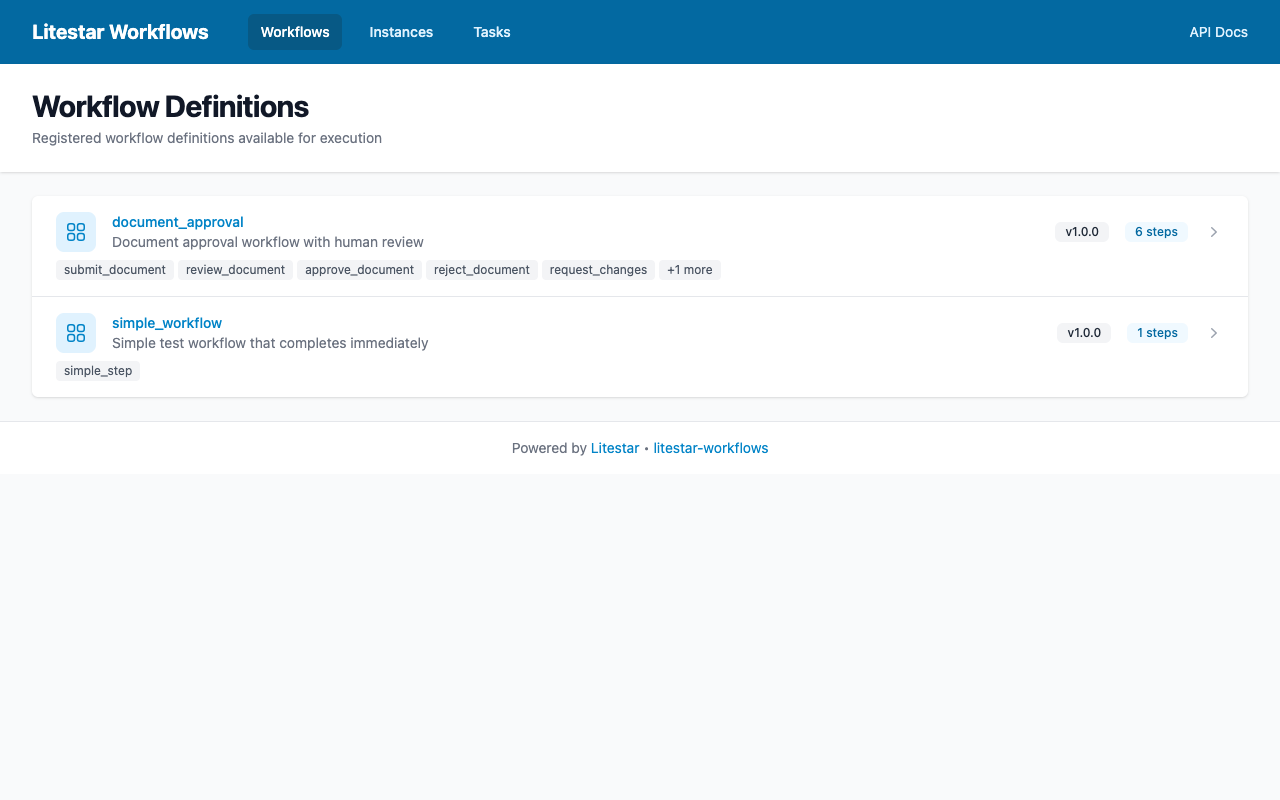
The built-in web UI showing registered workflows
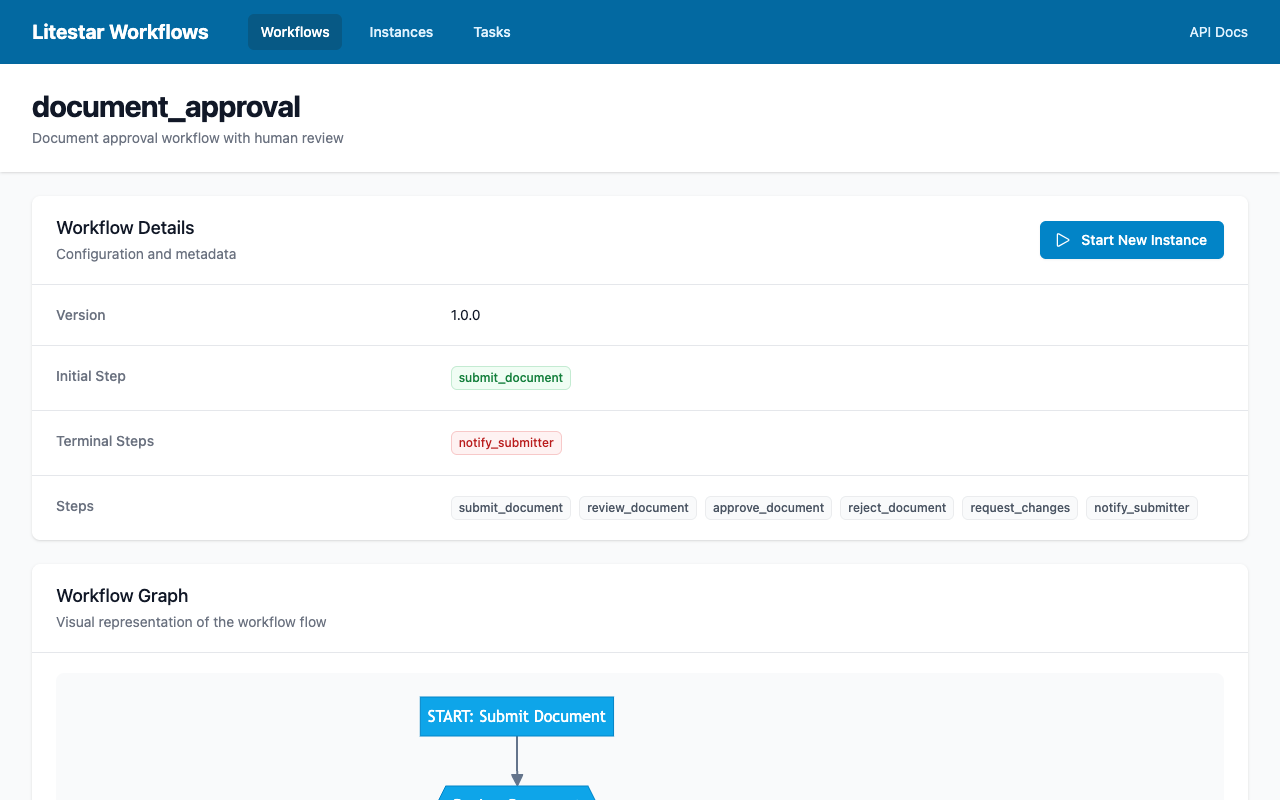
Workflow detail view with step visualization
Why Use the REST API?
While you can build custom API routes for workflow management (as shown in Working with Human Tasks), the built-in REST API provides a production-ready solution:
Without the built-in API:
You must implement all CRUD endpoints manually
OpenAPI documentation requires manual configuration
Authentication and authorization are handled per-endpoint
Graph visualization needs custom implementation
With the built-in API (enabled by default):
Complete REST API for workflows out of the box
Automatic OpenAPI schema generation with detailed descriptions
Centralized authentication via Litestar guards
Built-in MermaidJS graph visualization endpoints
Installation
Install the [web] extra (which includes [db] as a dependency):
pip install litestar-workflows[web]
This adds:
litestar-workflows[db]: Database persistence layer
advanced-alchemy: Repository pattern implementation
Quick Start
The REST API is enabled by default when you add the WorkflowPlugin to your
Litestar application:
from litestar import Litestar
from litestar_workflows import WorkflowPlugin, WorkflowPluginConfig

app = Litestar(
    route_handlers=[...],
    plugins=[
        WorkflowPlugin(
            config=WorkflowPluginConfig(
                enable_api=True,  # Default - API auto-enabled
                api_path_prefix="/workflows",
            )
        ),
    ],
)
That’s it! Your application now has workflow API routes at /workflows/*.
Configuration Options
The WorkflowPluginConfig dataclass controls the REST API behavior:
from litestar_workflows import WorkflowPluginConfig

config = WorkflowPluginConfig(
    # Enable/disable REST API endpoints (default: True)
    enable_api=True,

    # URL path prefix for all workflow endpoints
    api_path_prefix="/api/v1/workflows",

    # Include endpoints in OpenAPI schema (default: True)
    include_api_in_schema=True,

    # Apply guards to all workflow endpoints
    api_guards=[require_auth_guard],

    # OpenAPI tags for organization
    api_tags=["Workflows"],
)
Option |
Default |
Description |
|---|---|---|
|
|
Enable REST API endpoints |
|
|
Base URL path for all workflow routes |
|
|
Include routes in OpenAPI documentation |
|
|
List of Litestar guards applied to all routes |
|
|
OpenAPI tags for route grouping |
Disabling the API
If you only need the core workflow functionality without REST endpoints:
from litestar_workflows import WorkflowPlugin, WorkflowPluginConfig

app = Litestar(
    plugins=[
        WorkflowPlugin(
            config=WorkflowPluginConfig(enable_api=False)
        ),
    ],
)
Full Setup with Persistence
For a complete setup with database persistence:
from litestar import Litestar
from litestar.di import Provide
from sqlalchemy.ext.asyncio import create_async_engine, async_sessionmaker, AsyncSession

from litestar_workflows import WorkflowPlugin, WorkflowPluginConfig, WorkflowRegistry
from litestar_workflows.db import PersistentExecutionEngine

# Database setup
db_engine = create_async_engine(
    "postgresql+asyncpg://user:pass@localhost/workflows",
    echo=False,
)
session_factory = async_sessionmaker(db_engine, expire_on_commit=False)

# Workflow registry with your definitions
registry = WorkflowRegistry()
registry.register_definition(ApprovalWorkflow.get_definition())
registry.register_workflow_class(ApprovalWorkflow)


async def provide_session() -> AsyncSession:
    """Provide database session."""
    async with session_factory() as session:
        yield session


async def provide_engine(session: AsyncSession) -> PersistentExecutionEngine:
    """Provide workflow execution engine."""
    return PersistentExecutionEngine(registry=registry, session=session)


async def provide_registry() -> WorkflowRegistry:
    """Provide workflow registry."""
    return registry


# Create app with plugins
app = Litestar(
    route_handlers=[...],
    plugins=[
        WorkflowPlugin(
            config=WorkflowPluginConfig(
                auto_register_workflows=[ApprovalWorkflow],
                enable_api=True,
                api_path_prefix="/api/workflows",
            )
        ),
    ],
    dependencies={
        "session": Provide(provide_session),
        "workflow_engine": Provide(provide_engine),
        "workflow_registry": Provide(provide_registry),
    },
)
REST API Endpoints
The plugin registers three controller groups under the configured path prefix.
Workflow Definitions
Manage registered workflow definitions:
Method |
Endpoint |
Description |
|---|---|---|
GET |
|
List all registered workflow definitions |
GET |
|
Get a specific definition by name |
GET |
|
Get workflow graph visualization |
List Definitions:
curl http://localhost:8000/workflows/definitions
Response:
[
  {
    "name": "expense_approval",
    "version": "1.0.0",
    "description": "Multi-level expense approval workflow",
    "steps": ["submit", "manager_approval", "finance_approval", "process"],
    "edges": [
      {"source": "submit", "target": "manager_approval", "condition": null},
      {"source": "manager_approval", "target": "finance_approval", "condition": null}
    ],
    "initial_step": "submit",
    "terminal_steps": ["process"]
  }
]
Get Definition:
curl http://localhost:8000/workflows/definitions/expense_approval
Get Definition Graph:
# MermaidJS format (default)
curl "http://localhost:8000/workflows/definitions/expense_approval/graph?graph_format=mermaid"

# JSON format
curl "http://localhost:8000/workflows/definitions/expense_approval/graph?graph_format=json"
Response:
{
  "mermaid_source": "graph TD\n    submit[Submit]\n    manager_approval{{Manager Approval}}\n    ...",
  "nodes": [
    {"id": "submit", "label": "Submit", "type": "machine", "is_initial": true, "is_terminal": false}
  ],
  "edges": [
    {"source": "submit", "target": "manager_approval"}
  ]
}
Workflow Instances
Start and manage workflow executions:
Method |
Endpoint |
Description |
|---|---|---|
POST |
|
Start a new workflow instance |
GET |
|
List instances (with filtering) |
GET |
|
Get detailed instance information |
GET |
|
Get instance graph with execution state |
POST |
|
Cancel a running workflow |
POST |
|
Retry a failed workflow |
Start Workflow:
curl -X POST http://localhost:8000/workflows/instances \
  -H "Content-Type: application/json" \
  -d '{
    "definition_name": "expense_approval",
    "input_data": {
      "requester": "alice@example.com",
      "amount": 2500.00,
      "description": "Conference attendance"
    },
    "user_id": "alice@example.com"
  }'
Response:
{
  "id": "550e8400-e29b-41d4-a716-446655440000",
  "definition_name": "expense_approval",
  "status": "running",
  "current_step": "submit",
  "started_at": "2024-11-25T10:30:00Z",
  "completed_at": null,
  "created_by": "alice@example.com"
}
List Instances with Filters:
# Filter by status
curl "http://localhost:8000/workflows/instances?status=waiting"

# Filter by workflow name
curl "http://localhost:8000/workflows/instances?workflow_name=expense_approval"

# Pagination
curl "http://localhost:8000/workflows/instances?limit=20&offset=0"
Get Instance Details:
curl http://localhost:8000/workflows/instances/550e8400-e29b-41d4-a716-446655440000
Response:
{
  "id": "550e8400-e29b-41d4-a716-446655440000",
  "definition_name": "expense_approval",
  "status": "waiting",
  "current_step": "manager_approval",
  "started_at": "2024-11-25T10:30:00Z",
  "completed_at": null,
  "created_by": "alice@example.com",
  "context_data": {
    "requester": "alice@example.com",
    "amount": 2500.00,
    "description": "Conference attendance",
    "submitted": true
  },
  "metadata": {},
  "step_history": [
    {
      "id": "step-exec-001",
      "step_name": "submit",
      "status": "succeeded",
      "started_at": "2024-11-25T10:30:00Z",
      "completed_at": "2024-11-25T10:30:01Z",
      "error": null
    }
  ],
  "error": null
}
Get Instance Graph with State:
The instance graph endpoint returns a MermaidJS diagram with the current execution state highlighted:
curl http://localhost:8000/workflows/instances/550e8400.../graph
Response shows completed steps in green, current in yellow, failed in red:
{
  "mermaid_source": "graph TD\n    submit[Submit]\n    ...\n    style submit fill:#90EE90,stroke:#006400",
  "nodes": [...],
  "edges": [...]
}
Cancel Instance:
curl -X POST "http://localhost:8000/workflows/instances/550e8400.../cancel?reason=No%20longer%20needed"
Human Tasks
Manage pending human approval tasks:
Method |
Endpoint |
Description |
|---|---|---|
GET |
|
List tasks (with filtering) |
GET |
|
Get task details with form schema |
POST |
|
Complete task with form data |
POST |
|
Reassign task to another user |
List Tasks:
# List pending tasks
curl "http://localhost:8000/workflows/tasks?status=pending"

# Filter by assignee
curl "http://localhost:8000/workflows/tasks?assignee_id=manager@example.com"

# Filter by group
curl "http://localhost:8000/workflows/tasks?assignee_group=managers"
Response:
[
  {
    "id": "660e8400-e29b-41d4-a716-446655440001",
    "instance_id": "550e8400-e29b-41d4-a716-446655440000",
    "step_name": "manager_approval",
    "title": "Manager Approval",
    "description": "Review and approve expense request",
    "assignee": "manager@example.com",
    "status": "pending",
    "due_date": "2024-11-26T10:30:00Z",
    "created_at": "2024-11-25T10:30:01Z",
    "form_schema": {
      "type": "object",
      "properties": {
        "approved": {"type": "boolean", "title": "Approve?"},
        "comments": {"type": "string", "title": "Comments"}
      },
      "required": ["approved"]
    }
  }
]
Get Task Detail:
curl http://localhost:8000/workflows/tasks/660e8400...
Complete Task:
curl -X POST http://localhost:8000/workflows/tasks/660e8400.../complete \
  -H "Content-Type: application/json" \
  -d '{
    "output_data": {
      "approved": true,
      "comments": "Approved for Q4 budget"
    },
    "completed_by": "manager@example.com"
  }'
Reassign Task:
curl -X POST http://localhost:8000/workflows/tasks/660e8400.../reassign \
  -H "Content-Type: application/json" \
  -d '{
    "new_assignee": "other-manager@example.com",
    "reason": "Original assignee on vacation"
  }'
OpenAPI Schema Customization
The plugin generates comprehensive OpenAPI documentation automatically.
Excluding from Schema
Hide workflow routes from public API documentation:
config = WorkflowPluginConfig(
    include_api_in_schema=False,  # Routes work but don't appear in docs
)
Per-Environment Configuration
Show detailed endpoints only in development:
import os

config = WorkflowPluginConfig(
    include_api_in_schema=os.getenv("ENV") == "development",
)
MermaidJS Graph Visualization
The plugin includes endpoints for rendering workflow graphs as MermaidJS diagrams, which can be embedded in web UIs or documentation.
Definition Graph
Get the static workflow structure:
curl "http://localhost:8000/workflows/definitions/expense_approval/graph?graph_format=mermaid"
Response includes both the MermaidJS source and structured data:
{
  "mermaid_source": "graph TD\n    submit[Submit Request]\n    manager_approval{{Manager Approval}}\n    submit --> manager_approval",
  "nodes": [
    {"id": "submit", "label": "Submit Request", "type": "machine", "is_initial": true, "is_terminal": false},
    {"id": "manager_approval", "label": "Manager Approval", "type": "human", "is_initial": false, "is_terminal": false}
  ],
  "edges": [
    {"source": "submit", "target": "manager_approval"}
  ]
}
Instance Graph with State
Get a workflow graph showing execution progress:
curl http://localhost:8000/workflows/instances/{id}/graph
The MermaidJS includes styling to show:
Completed steps: Green highlighting (
fill:#90EE90)Current step: Yellow highlighting (
fill:#FFD700)Failed steps: Red highlighting (
fill:#FF6B6B)
Rendering in HTML
Use the MermaidJS library to render graphs:
<!DOCTYPE html>
<html>
<head>
  <script src="https://cdn.jsdelivr.net/npm/mermaid/dist/mermaid.min.js"></script>
</head>
<body>
  <div id="workflow-graph"></div>

  <script>
    mermaid.initialize({ startOnLoad: false });

    async function loadWorkflowGraph(instanceId) {
      const response = await fetch(`/workflows/instances/${instanceId}/graph`);
      const data = await response.json();

      const container = document.getElementById('workflow-graph');
      const { svg } = await mermaid.render('graph', data.mermaid_source);
      container.innerHTML = svg;
    }

    loadWorkflowGraph('550e8400-e29b-41d4-a716-446655440000');
  </script>
</body>
</html>
Node Shapes by Step Type
MermaidJS uses different shapes for different step types:
Step Type |
Shape |
Example |
|---|---|---|
Machine |
Rectangle |
|
Human |
Hexagon |
|
Gateway |
Diamond |
|
Timer |
Stadium |
|
Webhook |
Subroutine |
|
Data Transfer Objects (DTOs)
The REST API uses dataclass DTOs for request/response serialization:
Request DTOs
StartWorkflowDTO:
@dataclass
class StartWorkflowDTO:
    definition_name: str                  # Required: workflow to start
    input_data: dict[str, Any] | None     # Initial context data
    correlation_id: str | None            # Track related workflows
    user_id: str | None                   # Who started the workflow
    tenant_id: str | None                 # Multi-tenancy support
CompleteTaskDTO:
@dataclass
class CompleteTaskDTO:
    output_data: dict[str, Any]           # Form data submitted
    completed_by: str                     # User completing the task
    comment: str | None                   # Optional comment
Response DTOs
WorkflowDefinitionDTO:
@dataclass
class WorkflowDefinitionDTO:
    name: str
    version: str
    description: str
    steps: list[str]
    edges: list[dict[str, Any]]
    initial_step: str
    terminal_steps: list[str]
WorkflowInstanceDTO:
@dataclass
class WorkflowInstanceDTO:
    id: UUID
    definition_name: str
    status: str
    current_step: str | None
    started_at: datetime
    completed_at: datetime | None
    created_by: str | None
HumanTaskDTO:
@dataclass
class HumanTaskDTO:
    id: UUID
    instance_id: UUID
    step_name: str
    title: str
    description: str | None
    assignee: str | None
    status: str
    due_date: datetime | None
    created_at: datetime
    form_schema: dict[str, Any] | None
Example: Full Web API Integration
Here’s a complete example integrating the REST API with authentication and a frontend application.
Backend Setup
# app.py
from litestar import Litestar, get
from litestar.di import Provide
from litestar.connection import ASGIConnection
from litestar.handlers import BaseRouteHandler
from litestar.exceptions import NotAuthorizedException
from sqlalchemy.ext.asyncio import create_async_engine, async_sessionmaker

from litestar_workflows import (
    WorkflowPlugin,
    WorkflowPluginConfig,
    WorkflowRegistry,
    WorkflowDefinition,
    Edge,
    BaseMachineStep,
    BaseHumanStep,
    WorkflowContext,
)
from litestar_workflows.db import PersistentExecutionEngine

# Define workflow steps
class SubmitRequest(BaseMachineStep):
    name = "submit"
    description = "Submit the request"

    async def execute(self, context: WorkflowContext) -> dict:
        context.set("submitted", True)
        return {"status": "submitted"}

class ManagerReview(BaseHumanStep):
    name = "manager_review"
    title = "Review Request"
    form_schema = {
        "type": "object",
        "properties": {
            "approved": {"type": "boolean", "title": "Approved"},
            "comments": {"type": "string", "title": "Comments"},
        },
        "required": ["approved"],
    }

# Define workflow
class ApprovalWorkflow:
    __workflow_name__ = "approval"
    __workflow_version__ = "1.0.0"
    __workflow_description__ = "Simple approval workflow"

    @classmethod
    def get_definition(cls) -> WorkflowDefinition:
        return WorkflowDefinition(
            name=cls.__workflow_name__,
            version=cls.__workflow_version__,
            description=cls.__workflow_description__,
            steps={
                "submit": SubmitRequest(),
                "manager_review": ManagerReview(),
            },
            edges=[Edge("submit", "manager_review")],
            initial_step="submit",
            terminal_steps={"manager_review"},
        )

# Database setup
engine = create_async_engine("postgresql+asyncpg://localhost/workflows")
session_factory = async_sessionmaker(engine, expire_on_commit=False)

# Registry
registry = WorkflowRegistry()
registry.register_definition(ApprovalWorkflow.get_definition())
registry.register_workflow_class(ApprovalWorkflow)


# Dependency providers
async def provide_session():
    async with session_factory() as session:
        yield session


async def provide_engine(session):
    return PersistentExecutionEngine(registry=registry, session=session)


async def provide_registry():
    return registry


# Authentication guard
async def require_auth(
    connection: ASGIConnection,
    route_handler: BaseRouteHandler,
) -> None:
    if not connection.user:
        raise NotAuthorizedException(detail="Authentication required")


# Health endpoint
@get("/health")
async def health_check() -> dict:
    return {"status": "healthy"}


# Create application
app = Litestar(
    route_handlers=[health_check],
    plugins=[
        WorkflowPlugin(
            config=WorkflowPluginConfig(
                auto_register_workflows=[ApprovalWorkflow],
                enable_api=True,
                api_path_prefix="/api/workflows",
                api_guards=[require_auth],
                api_tags=["Workflow API"],
            )
        ),
    ],
    dependencies={
        "session": Provide(provide_session),
        "workflow_engine": Provide(provide_engine),
        "workflow_registry": Provide(provide_registry),
    },
)
Frontend Task Inbox
// task-inbox.js

class TaskInbox {
  constructor(apiBase = '/api/workflows') {
    this.apiBase = apiBase;
  }

  async loadTasks() {
    const response = await fetch(`${this.apiBase}/tasks?status=pending`, {
      headers: { 'Authorization': `Bearer ${this.getToken()}` }
    });
    return response.json();
  }

  async getTask(taskId) {
    const response = await fetch(`${this.apiBase}/tasks/${taskId}`, {
      headers: { 'Authorization': `Bearer ${this.getToken()}` }
    });
    return response.json();
  }

  async completeTask(taskId, formData, completedBy) {
    const response = await fetch(`${this.apiBase}/tasks/${taskId}/complete`, {
      method: 'POST',
      headers: {
        'Authorization': `Bearer ${this.getToken()}`,
        'Content-Type': 'application/json',
      },
      body: JSON.stringify({
        output_data: formData,
        completed_by: completedBy,
      }),
    });

    if (!response.ok) {
      throw new Error('Failed to complete task');
    }

    return response.json();
  }

  getToken() {
    return localStorage.getItem('auth_token');
  }
}

// Usage
const inbox = new TaskInbox();
inbox.loadTasks().then(tasks => {
  console.log('Pending tasks:', tasks);
});
Starting Workflows from UI
async function startExpenseRequest(data) {
  const response = await fetch('/api/workflows/instances', {
    method: 'POST',
    headers: {
      'Authorization': `Bearer ${getToken()}`,
      'Content-Type': 'application/json',
    },
    body: JSON.stringify({
      definition_name: 'expense_approval',
      input_data: {
        requester: data.email,
        amount: data.amount,
        description: data.description,
      },
      user_id: data.email,
    }),
  });

  if (!response.ok) {
    throw new Error('Failed to start workflow');
  }

  const instance = await response.json();
  showNotification(`Request submitted! ID: ${instance.id}`);
  return instance;
}
Error Handling
The REST API uses standard HTTP status codes and Litestar exceptions:
Status |
Exception |
Meaning |
|---|---|---|
400 |
|
Invalid request data or form submission |
401 |
|
Authentication required |
403 |
|
Insufficient permissions |
404 |
|
Workflow, instance, or task not found |
409 |
|
Invalid state transition |
Handle errors in your frontend:
async function completeTask(taskId, data) {
  try {
    const response = await fetch(`/api/workflows/tasks/${taskId}/complete`, {
      method: 'POST',
      headers: { 'Content-Type': 'application/json' },
      body: JSON.stringify({ output_data: data, completed_by: userId }),
    });

    if (!response.ok) {
      const error = await response.json();
      switch (response.status) {
        case 400:
          showFormErrors(error.detail);
          break;
        case 404:
          showError('Task no longer exists');
          break;
        case 409:
          showError('Task already completed');
          break;
        default:
          showError('An error occurred');
      }
      return;
    }

    showSuccess('Task completed!');
  } catch (e) {
    showError('Network error');
  }
}
Best Practices
Use Guards Consistently
Always configure authentication for production:
import os

if os.getenv("ENV") == "development":
    config = WorkflowPluginConfig()  # No auth for easier testing
else:
    config = WorkflowPluginConfig(api_guards=[require_auth])
Scope Dependencies Properly
Use request-scoped sessions for proper transaction management:
async def provide_session() -> AsyncSession:
    """Each request gets its own session."""
    async with session_factory() as session:
        yield session
        # Session automatically closed after request
Monitor Task Completion
Track task completion times and SLA breaches:
from datetime import datetime, timezone
from litestar import get
from litestar_workflows.db import HumanTaskRepository

@get("/api/metrics/tasks")
async def task_metrics(session: AsyncSession) -> dict:
    repo = HumanTaskRepository(session=session)
    overdue = await repo.find_overdue()

    return {
        "overdue_count": len(overdue),
        "overdue_tasks": [
            {
                "id": str(t.id),
                "title": t.title,
                "hours_overdue": (
                    datetime.now(timezone.utc) - t.due_at
                ).total_seconds() / 3600,
            }
            for t in overdue
        ],
    }
See Also
Database Persistence - Database persistence setup
Working with Human Tasks - Human task workflow patterns
Phase 3: Web Plugin Architecture - Web plugin architecture details
Web Plugin API Reference - Complete Web Plugin API reference